 xxxsjan Docs
富文本
quill
wangeditor
pnpm add @wangeditor/editor @wangeditor/editor-for-vue@next示例代码
<template>
  <div style="border: 1px solid #ccc">
    <Toolbar
      style="border-bottom: 1px solid #ccc"
      :editor="editorRef"
      :defaultConfig="toolbarConfig"
      :mode="mode"
    />
    <Editor
      style="height: 500px; overflow-y: hidden"
      v-model="valueHtml"
      :defaultConfig="editorConfig"
      :mode="mode"
      @onCreated="handleCreated"
    />
  </div>
</template>

<script setup>
import { Editor, Toolbar } from "@wangeditor/editor-for-vue";
import "@wangeditor/editor/dist/css/style.css"; // 引入 css

// 编辑器实例,必须用 shallowRef
const editorRef = shallowRef();

// 内容 HTML
const valueHtml = ref("<p>hello</p>");

// 模拟 ajax 异步获取内容
onMounted(() => {
  setTimeout(() => {
    valueHtml.value = "<p>模拟 Ajax 异步设置内容</p>";
  }, 1500);
});

const toolbarConfig = {};
const editorConfig = { placeholder: "请输入内容..." };

// 组件销毁时,也及时销毁编辑器
onBeforeUnmount(() => {
  const editor = editorRef.value;
  if (editor == null) return;
  editor.destroy();
});

const handleCreated = (editor) => {
  editorRef.value = editor; // 记录 editor 实例,重要!
};
const mode = "default"; // 或 'simple'
</script>
自定义功能
https://blog.csdn.net/QiZi_Zpl/article/details/130402877
表情
https://www.linyufan.com/content/10/1823-1.html
javascript
const toolbarKeys = ["emotion"];
const toolbarConfig = {
  toolbarKeys,
};

editor.config.emotions = [
    {
      title: this.moodemoji_data[i]['alt'],
      type: 'image',
      content: this.moodemoji_data[i]['children']
    }
];
tinymce
https://juejin.cn/post/7157711019442176031
下载社区版
解压到public
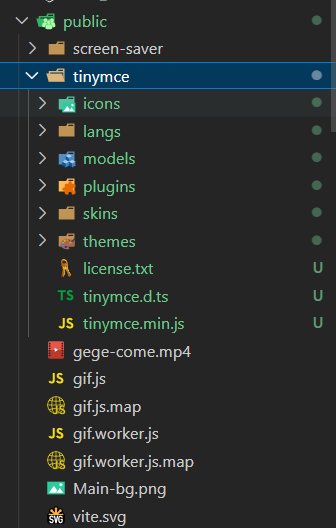
设置中文
https://www.tiny.cloud/get-tiny/language-packages/
vue里
<script setup>
const tinymceId =
  "vue-tinymce-" + +new Date() + ((Math.random() * 1000).toFixed(0) + "");
const src = "./tinymce/tinymce.min.js";

function dynamicLoadScript(src) {
  const script = document.createElement("script");
  script.src = src;
  script.id = src;
  document.body.appendChild(script);
  script.onload = function () {
    initTinymce();
  };
}
function initTinymce() {
  const init = {
    selector: `#${tinymceId}`,
    toolbar: "customButton",
    menubar: false,
    branding: false,
    statusbar: false,
    setup: function (editor) {
      editor.ui.registry.addIcon(
        "triangleUp",
        '<svg height="24" width="24"><path d="M12 0 L24 24 L0 24 Z" /></svg>'
      );
      editor.ui.registry.addButton("customButton", {
        icon: "triangleUp",
        tooltip: "Custom Button",
        onAction: function () {
          console.log(1);
          openImageDialog(editor);
        },
      });
    },
  };
  window.tinymce.init(init);

  function openImageDialog(editor) {
    var audioEl = document.createElement("audio");
    audioEl.controls = true;
    audioEl.src = "https://web-tool.odep.xyz/ikun/%E9%B8%A1.wav";
    editor.insertContent(audioEl.outerHTML);
  }
}
onMounted(() => {
  dynamicLoadScript(src);
});
</script>

<template>
  <main id="sample">
    <textarea :id="tinymceId" class="tinymce-textarea" />
  </main>
</template>

<style scoped></style>
toolbar工具栏
- lineheight(行高 V5.5新增)
- newdocument(新文档)
- underline(下划线)
- strikethrough(删除线)
- styleselect(格式设置)
- formatselect(段落格式)
- fontselect(字体选择)
- fontsizeselect(字号选择)
- cut(剪切)
- copy(复制)
- paste(粘贴)
- bullist(项目列表UL)
- numlist(编号列表OL)
- outdent(减少缩进)
- indent(增加缩进)
- blockquote(引用)
- removeformat(清除格式)
- subscript(下角标)
- superscript(上角标)
默认
- undo(撤销)
- redo(重做/重复)
- styles ----- 段落(包含 标题、 文本、 样式 、对齐)
- bold(加粗)
- italic(斜体)
- alignleft(左对齐)
- aligncenter(居中对齐)
- alignright(右对齐)
- alignjustify(两端对齐)
- outdent(减少缩进)
- indent(增加缩进)
默认值

undo redo bold  italic alignleft aligncenter alignright alignjustify outdent indent

tinymce.init({
  selector: 'textarea',  // change this value according to your HTML
  toolbar: [
    { name: 'history', items: [ 'undo', 'redo' ] },
    { name: 'styles', items: [ 'styles' ] },
    { name: 'formatting', items: [ 'bold', 'italic' ] },
    { name: 'alignment', items: [ 'alignleft', 'aligncenter', 'alignright', 'alignjustify' ] },
    { name: 'indentation', items: [ 'outdent', 'indent' ] }
  ]
});
toolbar分组
单行
tinymce.init({
    selector: `#${this.tinymceId}`,
    plugins : 'link image', // 先引入插件link image
    toolbar: 'bold italic | link image | undo redo',
});
多行
tinymce.init({
    selector: 'textarea',
    toolbar: [
        'undo redo | bold italic ',
        'alignleft alignright',
    ],
});
样式
body_class: "panel-body ",
content_style: ".panel-body{ background-color: #1e1e1e; color: #ccc}"
皮肤
"Silver"是TinyMCE的默认主题。
TinyMCE v5 的默认皮肤是“oxide”,它包含浅色版本和深色版本。默认oxide是浅色版。下面的例子将使用深色版皮肤。
tinymce.init({
    selector: `#${this.tinymceId}`,
    language:'zh_CN',
    // 编辑器深色外观,包括工具栏和菜单栏
    skin: "oxide-dark",
    // content_css: "dark"  // 可编辑区域的样式
    body_class: "panel-body ",
    // 可编辑区域的样式
    content_style: ".panel-body{ background-color: #222f3e; color: #fff}"
});
获取文本内容
通过activeEditor 和 元素id都可以
activeEditor 文档 ,返回实例
https://www.tiny.cloud/docs/tinymce/6/apis/tinymce.root/#properties
实例的文档
https://www.tiny.cloud/docs/tinymce/6/apis/tinymce.editor/
function getText() {
  const editor = window.tinymce.activeEditor;
  // const editor = window.tinymce.get(tinymceId);
  console.log("content: ", editor.getContent());
}
toolbar模式
四种模式
floating 泡泡提示
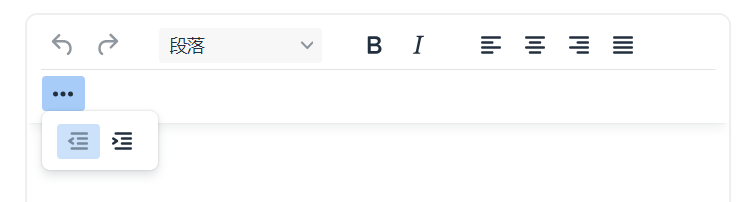
sliding 下拉显示
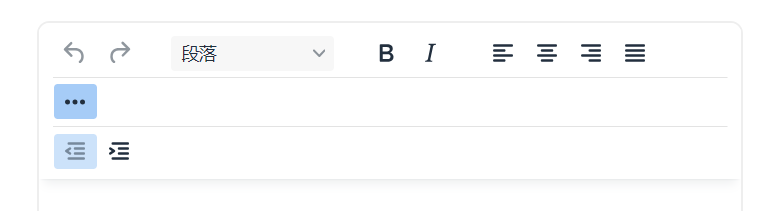
scrolling 左右滚动
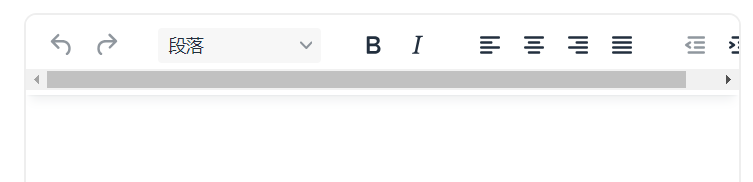
wrap 全显示
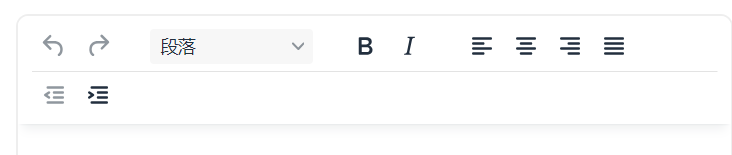
init({
  toolbar_mode:'floating'
})
style_formats
https://www.tiny.cloud/docs/tinymce/6/user-formatting-options/#style_formats
style_formats: [
  { title: 'Headings', items: [
    { title: 'Heading 1', format: 'h1' },
    { title: 'Heading 2', format: 'h2' },
    { title: 'Heading 3', format: 'h3' },
    { title: 'Heading 4', format: 'h4' },
    { title: 'Heading 5', format: 'h5' },
    { title: 'Heading 6', format: 'h6' }
  ]},
  { title: 'Inline', items: [
    { title: 'Bold', format: 'bold' },
    { title: 'Italic', format: 'italic' },
    { title: 'Underline', format: 'underline' },
    { title: 'Strikethrough', format: 'strikethrough' },
    { title: 'Superscript', format: 'superscript' },
    { title: 'Subscript', format: 'subscript' },
    { title: 'Code', format: 'code' }
  ]},
  { title: 'Blocks', items: [
    { title: 'Paragraph', format: 'p' },
    { title: 'Blockquote', format: 'blockquote' },
    { title: 'Div', format: 'div' },
    { title: 'Pre', format: 'pre' }
  ]},
  { title: 'Align', items: [
    { title: 'Left', format: 'alignleft' },
    { title: 'Center', format: 'aligncenter' },
    { title: 'Right', format: 'alignright' },
    { title: 'Justify', format: 'alignjustify' }
  ]}
]