 xxxsjan Docs
渡一学习
实现标签页打开控制
BroadcastChannel只支持同源页面
const channel = new BroadcastChannel("music")
channel.postMessage({
    musicName:'只因你太美'
})


另一个页面  频道名要一样music
const channel = new BroadcastChannel("music")

channel.addEventListener('message',(e)=>{
    console.log(e.data.musicName)
})

封装
function createChannel(name){
    const channel = new BroadcastChannel(name)
    channel.id = createId(name);
    channel.listeners = new Set();
    channel.addEventListener('message',(e)=>{
       if(e.data.msg === 'coming'){
           channel.listeners.add(e.data.id)
       }
       if(e.data.msg === 'leave'){
           channel.listeners.remove(e.data.id)
       }
    });
    window.addEventListener("upload",function(){
         sendMag('leave',channel);
    })
    sendMag('coming',channel);
    return channel;
}
function createId(name){
    const key = "channel-name";
    let id = +localStorage.getItem(key);
    if(!id){ id = 0 }
    id++
    localStorage.setItem(key,id.toSting())
    return id
}
function sendMsg(msg,channel){
    channel.postMessage({ msg ,id:channel.id})
}

// 使用
const channel=createChannel('music')
if(channel.listeners.size ===0){
    window.open()
}else{
    channel.postMessage({
        msg:''
    })
}
HTMLCollection NodeList
HTMLCollection :getElementByTagName getElementById
NodeList : querySelector
HTMLCollection 会实时变动,遍历过程中假如追加会死循环
NodeList 记录的是快照
保持图片清晰度
设计稿的值乘上设备像素比,是最终要的图片宽度的值
比如要显示一张500的图片,当前设备像素比是2,也就是系统(系统设置里面的缩放100% 125%那个)基于物理像素放大了2倍
500的图实际使用的是1000个像素点,所以模糊,这时需要显示1000的图片才可以
代码
可以通过backgtound-image 的--webkit-image-set设置多张图
会根据浏览器缩放实时变更图片
backgtound-image :--webkit-image-set('./img@500 1x,./img@1000 2x,./img@1500 3x')也可以用过img标签的srcset设置
不会根据浏览器缩放实时变更图片
<img srcset="./img@500 1x,./img@1000 2x,./img@1500 3x" />vue封装hook 获取img宽度的
function useWidth(imgRef){
    const width = ref(0);
    const observer = new ResizeObserver(()=>{
        width.value = imgRef.value.width
    })
    let img = null;
    watchEffect(()=>{
        const _img = imgRef.value
        if(_img){
           img = _img
           observer.oberve(img)
         }else if(img){
           observer.unoberve(img)
        }
    })
    return {width}
}

function useDpr(){
    const dpr = ref(window.decivePixelRatio);
    const observer = new ResizeObserver(()=>{
        dpr.value = window.decivePixelRatio
    })
      observer.oberve(document.documentElement)
    onUnmounted(()=>{
      observer.unoberve(document.documentElement)
    })
    return {dpr}
}
230.如何实现高度自动的过渡
grid-template-rows
<!DOCTYPE html>
<html lang="en">
    <head>
        <meta charset="UTF-8" />
        <meta http-equiv="X-UA-Compatible" content="IE=edge" />
        <meta name="viewport" content="width=device-width, initial-scale=1.0" />
        <title>Perfect</title>
        <style>
            .detail {
                overflow: hidden;
            }
            .content {
                width: 200px;
                border-radius: 5px;
                background: #007bff;
                color: #fff;
                line-height: 1.5;

                min-height: 0;
            }

            .detail {
                display: grid;
                grid-template-rows: 0fr;
                transition: 0.5s;
            }
            .btn:hover .detail {
                grid-template-rows: 1fr;
            }
        </style>
    </head>
    <body>
        <div class="btn">
            hover me
            <div class="detail">
                <div class="content">
                    <div class="inner">
                        Lorem ipsum dolor sit amet consectetur adipisicing elit. Minus facilis eligendi, explicabo
                        exercitationem ex quos eveniet delectus quas rem labore debitis accusamus deleniti similique
                        ducimus aperiam nisi dolore voluptatum maiores.
                    </div>
                </div>
            </div>
        </div>
    </body>
</html>
分片上传
文件需要hash hash算法可用md5实现 md5的库有spark-md5
file调用slice即可得到blob对象 File 和 Blob对象只记录文件的信息,没有资源的内容 要得到内容要使用FileReader去读取
实现
fileInput.onchange = async function () {
  const file = this.files[0]
  // 使用
  const chunks = createChunks(file, 10 * 1024 * 1024)
  console.log("chunks: ", chunks)
  const fileHash = await hash(chunks) // 得到file的hash值
  console.log("fileHash: ", fileHash)
}
function createChunks(file, chunkSize) {
  const result = []
  for (let i = 0; i < file.size; i += chunkSize) {
    result.push(file.slice(i, i + chunkSize))
  }
  return result
}
// 增量算法
// 算hash 因为一个文件太大,cpu内存吃不消,通过调用spark.append一片片去算
function hash(chunks) {
  return new Promise((resolve, reject) => {
    const spark = new SparkMD5() // spark-md5库
    function _read(i) {
      if (i >= chunks.length) {
        resolve(spark.end()) // 返回hash值
        return
      }
      const blob = chunks[i]
      const reader = new FileReader()
      reader.onload = e => {
        const bytes = e.target.result
        spark.append(bytes)
        _read(i + 1)
      }
      reader.readAsArrayBuffer(blob)
    }
    _read(0)
  })
}
web-worker
由于耗时,可以放到web worker里进行处理
function getHashByWorker(chunkList) {
  return new Promise(resolve => {
    const worker = new Worker("./hash.js")
    worker.postMessage({ chunkList })
    worker.onmessage = e => {
      const { hash } = e.data
      if (hash) {
        resolve(hash)
      }
    }
  })
}

// hash.js
self.importScripts("./spark-md5.min.js")
self.onmessage = e => {
    const { chunkList } = e.data
    hash(chunkList).then(res => {
        self.postMessage({
            hash: res,
        })
    })
}

function hash(chunks) {
    return new Promise((resolve, reject) => {
        const spark = new SparkMD5() // spark-md5库
        function _read(i) {
            if (i >= chunks.length) {
                resolve(spark.end()) // 返回hash值
                return
            }
            const blob = chunks[i]
            const reader = new FileReader()
            reader.onload = e => {
                const bytes = e.target.result
                spark.append(bytes)
                _read(i + 1)
            }
            reader.readAsArrayBuffer(blob)
        }
        _read(0)
    })
}
目录结构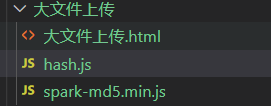
大文本请求
web-chowder\nodejs\express\server-demo
async function run() {
        const resp = await fetch("http://localhost:8080/xiaoshuo.txt");
        // const text = await resp.text();
        // console.log("text: ", text);

        const reader = resp.body.getReader();
        const contentLength = resp.headers.get("content-length");
        console.log("contentLength: ", contentLength);
        for (;;) {
          const { value, done } = await reader.read();
          if (done) {
            break;
          }
          const decoder = new TextDecoder();
          const text = decoder.decode(value);
          // console.log("文本", text);
          console.log("进度", value.length, contentLength);
        }
      }
run();
input button使用一个事件的优化方案
场景:input 回车触发搜索,按钮点击触发搜索
问题:输入法选词也会触发回车事件
优化:使用form管理提交事件
<form @submit="onSearch">
  <button type="submit">搜索</button>
</form>

function onSearch(e){
	e.preventDefault();// 阻止提交造成的页面刷新
}
vite静态资源动态访问
问题
常规background-image:url(./assets/1.jpg)
一般打包后会变成带文件指纹的 background-image:url(./assets/1-asasasa.jpg)
假如需要动态改变 background-image:url(./assets/v-bind(name).jpg)
或者html里 style 写 background-image:url(./assets/${name}.jpg)
这样打包后编译只会是 background-image:url(./assets/1.jpg) ,
会出现找不到图片的情况
解决
解决1
import img1 from './assest/1.jpg'
import img2 from './assest/2.jpg'

img1 img2 拿到打包后带文件指纹的路径
解决2
watchEffect(()=>{
  const module = import(`./assets/${name }.jpg`)
  console.log(module.default)
})
这样构建工具会分析./assets/ 下所有jpg后缀的文件,都输出到dist,会有jpg文件和其对应的一份js文件
比如1.jpg会输出两个文件
1 图片文件:1-asasa.jpg
2 js文件:
const s = '/assets/1-asasa.jpg'
export { s as default }
解决3
const url =computed(()=>{
  const obj = new URL(`./assets/${name}.jpg`)
  return obj.pathname
})
使用
style 里 background-image:url(`${url}`)
原理
构建工具会分析URL里的内容 ,他会帮你装换路径,
`./assets/${name}.jpg`会输出assets下所有jpg文件到dist下,带文件指纹的
和 解决2方法不一样的是他不会有js文件,因为他不是import形式导入的
总结
构建工具会转换引用的地址有
1 img 的src
2 css 的 backgroundImage
3 import()动态导入的,只能是局部的,例如./assets/${name}.jpg
4 new URL(./assets/${name}.jpg)
获取组件的类型
const formRef = ref<typeof ElForm>()
// 但 formRef 可能是 undefined
// 使用时只能断言或者可选链

// 解决
const formRef = ref<InstanceType<typeof ElForm>>()

// 封装
function useComRef<T extends abstract new (...args:any)=>any >(_comp:T){
	return ref<InstanceType<T>>()
}

const formRef = useComRef<typeof ElForm>()
小球移动动画
包括x y轴,作用在同一个dom上
视频名:贝塞尔曲线实现复杂动画
动画只能作用于属性 hounidi api,--x用css变量不能生效
@property --x {
  syntax:'<length>';
  initial-value:0px;
  inherits:false
}
@property --y {
  syntax:'<length>';
  initial-value:0px;
  inherits:false
}
.ball{
  transform:translate(var(--x),var(--y));
  animation: x 1s,y 2s;
  animation-iteration-count:infinite;
  animation-timing-function:cubic-bezier(0.5,-800,0.5,800);
}

@keyframes x {
 to {
   --x:1px;
 }
}
@keyframes y {
 to {
   --y:0.1px;
 }
}
文字环绕
css

 shape-outside:circle(50% at 50% 50%)