 xxxsjan Docs
scroll+getBoundingClientRect实现
index.js
typescript
<img v-lazy="item.src" :alt="item.title" />每个img都有v-lazy
typescript
import LazyLoad from './LazyLoad'

export default {
    install(Vue, options) {

        const lazyClass = LazyLoad(Vue)
        const lazyIns = new lazyClass(options)

        Vue.directive('lazy', {
            bind: lazyIns.bindLazy.bind(lazyIns)
        })
    }

}
Vue安装插件时,使用的是一个实例,因为可以公用一份options
typescript
import Vue from 'vue'
import App from './App.vue'
// import VueLazyload from './modules/vue-lazyload';// pp小野
import VueLazyload from './modules/my-lazyload';

Vue.config.productionTip = false

Vue.use(VueLazyload, {
  loading: 'http://localhost:3000/images/loading.gif',
  error: 'http://localhost:3000/images/error.jpg',
  preload: 1
})

new Vue({
  render: h => h(App),
}).$mount('#app')
LazyLoad.js
为当前el,也就是img标签的父级元素添加监听 通过事件委托addEventlistener监听滚动事件 首次加载,没有滚动事件触发,需要手动调用一次 以触发img内容初始化(设置src)
typescript
import LazyImg from "./LazyImg";

function getScrollParent(el) {
  let _parent = el.parentNode;
  while (_parent) {
    const styleOverflow = getComputedStyle(_parent)["overflow"];
    // style只能获取行内设置的,所以用getComputedStyle
    if (/(scroll)|(auto)/.test(styleOverflow)) {
      return _parent;
    }
    _parent = _parent.parentNode;
  }
}

export default function LazyLoad(Vue) {
  return class Lazy {
    constructor(options) {
      this.options = options;
      this.lazyImgList = [];
    }

    bindLazy(el, bindings, vnode) {
      Vue.nextTick(() => {
        const lazyImg = new LazyImg({
          el: el,
          src: bindings.value,
          options: this.options,
        });
        const scrollParent = getScrollParent(el);
        scrollParent &&
          scrollParent.addEventListener(
            "scroll",
            this.handleScroll.bind(this),
            false
          );

        this.lazyImgList.push(lazyImg);
        this.handleScroll();
      });
    }

    handleScroll() {
      console.log('scroll监听',)
      // 滚动事件可以用 timeout 和 requestAnimationFrame 实现节流
      this.lazyImgList.forEach((lazyImg) => {
        !lazyImg.loaded && lazyImg.setImgSrc();
      });
    }
  };
}
LazyImg.js
是否在可视区的判断
preload 就是多加载多少区域,这样用户刚滚动就能看到,不会有等待的体验 const { top } = this.el.getBoundingClientRect();
Element.getBoundingClientRect() 方法返回一个 DOMRect 对象,其提供了元素的大小及其相对于视口的位置。
top < window.innerHeight * (this.options.preload || 1.3); 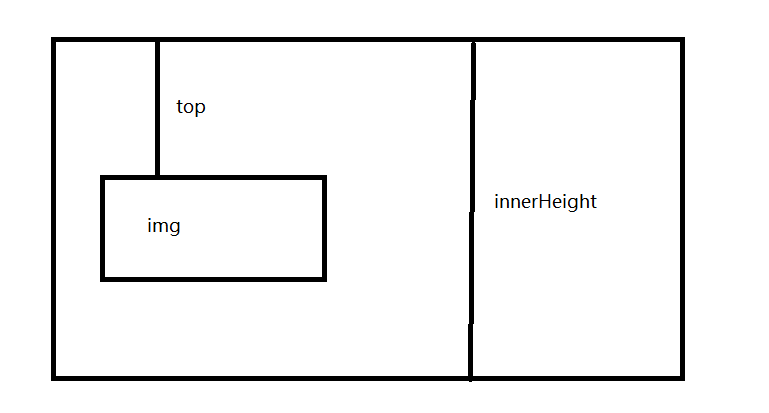
typescript
function imgLoad(src) {
  return new Promise((resolve, reject) => {
    const oImg = new Image();
    oImg.src = src;
    oImg.onload = resolve;
    oImg.onerror = reject;
  });
}
export default class LazyImg {
  constructor({ el, src, options }) {
    this.src = src;
    this.el = el;
    this.options = options;

    this.loaded = false;

    this.state = {
      loading: false,
      error: false,
    };
  }
  isClient() {
    const { top } = this.el.getBoundingClientRect();
    console.log('isClient', top, this.el.clientTop);

    return top < window.innerHeight * (this.options.preload || 1.3);
  }
  imgRender(state) {
    const { loading, error } = this.state;
    let src = '';
    switch (state) {
      case 'loading':
        src = loading || '';
        break;
      case 'error':
        src = error || '';
        break;
      default:
        src = this.src;
        break;
    }
    this.el.setAttribute('src', src);
  }
  setImgSrc() {
    this.imgRender('loading');
    if (this.isClient() && !this.loaded) {
      imgLoad(this.src).then(
        () => {
          this.state.loading = true;
          this.imgRender('ok');
          this.loaded = true;
        },
        () => {
          this.state.error = true;
          this.imgRender('error');
          this.loaded = true;
        }
      );
    }
  }
}
Intersection Observer交叉器
https://blog.csdn.net/qq_54753561/article/details/122820632
typescript
IntersectionObserver.observe()     使`IntersectionObserver`开始监听一个目标元素。
IntersectionObserver.unobserve()   使IntersectionObserver停止监听特定目标元素。
IntersectionObserver.disconnect()  使IntersectionObserver对象停止监听工作。
IntersectionObserver.takeRecords()  返回所有观察目标的IntersectionObserverEntry对象数组。
typescript
let ob = new IntersectionObserver(
    entries => {
        // entries 是个数组包含所有的监听对象和视口的交叉位置
        entries.forEach(item => {
            if (item.isIntersecting) {
                let target = item.target; // 拿到当前监听的盒子
                console.log(target);
                // el.src = bing.value;
                target.src = target.getAttribute('data-src');
                ob.unobserve(target); // 加载完移除监听
            }
        });
    },
    {
        threshold: [1] // 0 一露头 0.5 露一半 1 完全出现 // threshold 控制交叉状态在什么养的情况下触发上面的回调
    }
);

export default {
    install(Vue, options) {
        // bind: function () {},
        // inserted: function () {},
        // update: function () {},
        // componentUpdated: function () {},
        // unbind: function () {}
        Vue.directive('lazy2', function (el) {
            console.log('lazy2----', el);
            ob.observe(el);
        });
    }
};