 xxxsjan Docs
使用Tapable出发事件 插件基本结构
javascript
class Myplugin{
  constructor(){

  }
  apply(compiler){
    compiler.hooks.emit.tap("MyPlugin",function (compilation){

    })
    compiler.hooks.make.tapAsync("MyPlugin",function (compilation){
      compilation.hooks.seal.tap("MyPlugin",()=>{})
    })
  }
}
使用本地插件,要找到包可以设置
javascript
resolveLoader: {
    modules: ['node_modules', resolve(__dirname, 'modules')],
  },
生命周期 webpack 根据入口文件创建compiler对象 下一步 compiler.run() compiler.compilation() ------create compilation object compiler.make() -----并行 create compilation compilation.buildModule() compilation.seal() compilation.optimize() 优化 compilation.reviveChunks() compilation.seal() compiler.afterCompile() compiler.emit() ----串行 compiler.emitAssets() 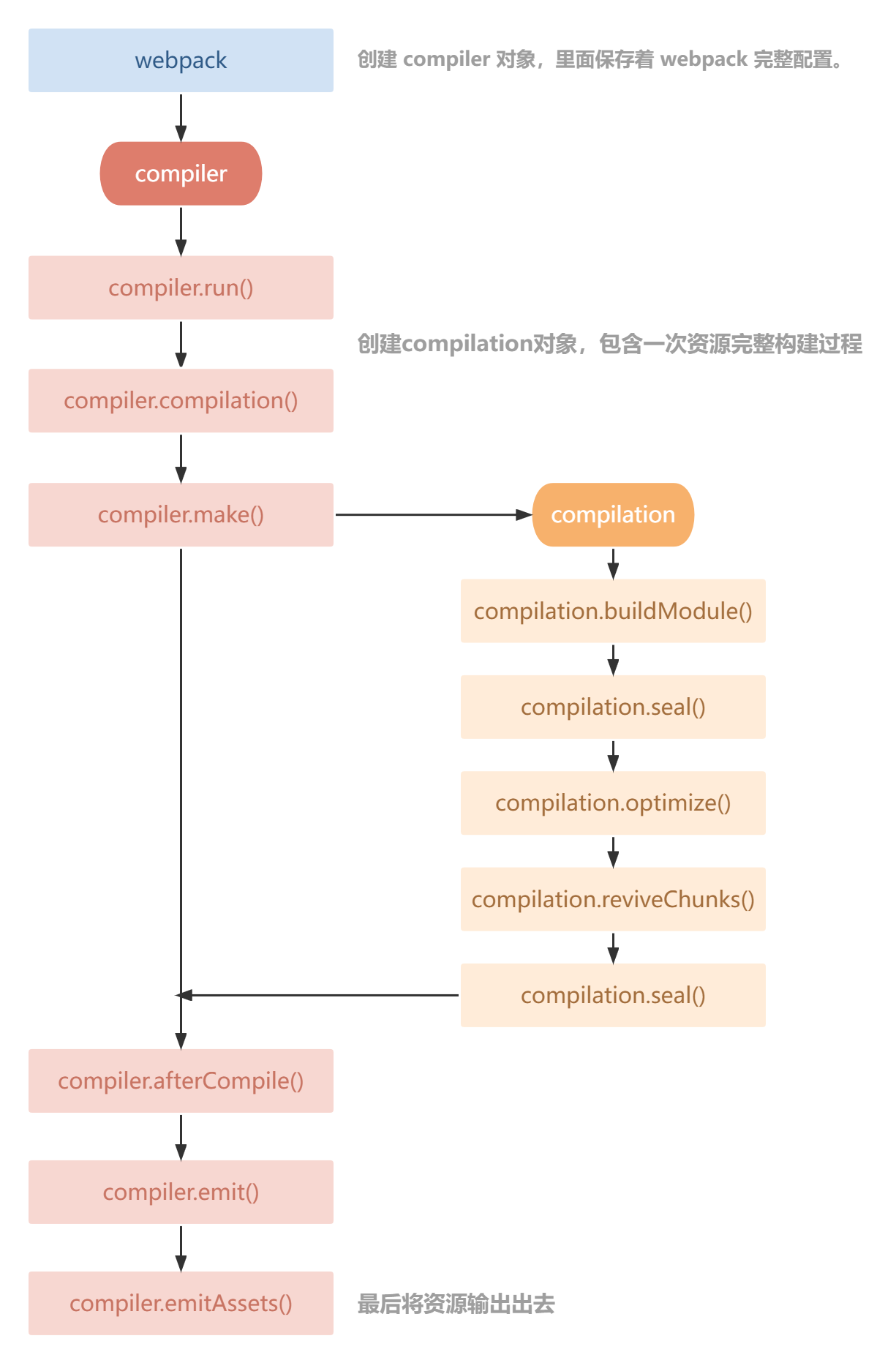
Compiler
compiler.hooks.emit.tap 串行执行 前面异步会阻塞后面 compiler.hooks.make 并行执行,就是异步
tap tapAsync tapPromise
Compilation
调试node 查看compiler有什么属性 写在js写上debugger 执行 node --inspect-brk ./src/xxx.js 打开浏览器,f12 左上角看到nodejs图标 点击图标
点击图标 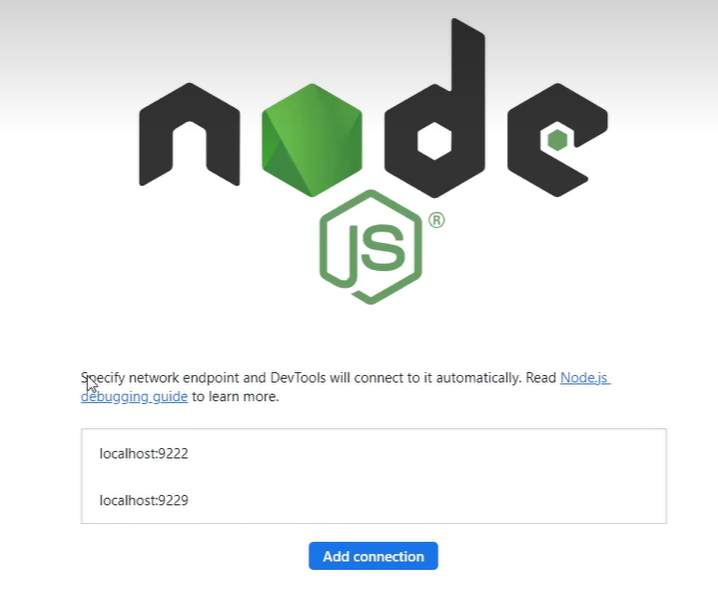 执行debugger,会执行到下一个debugger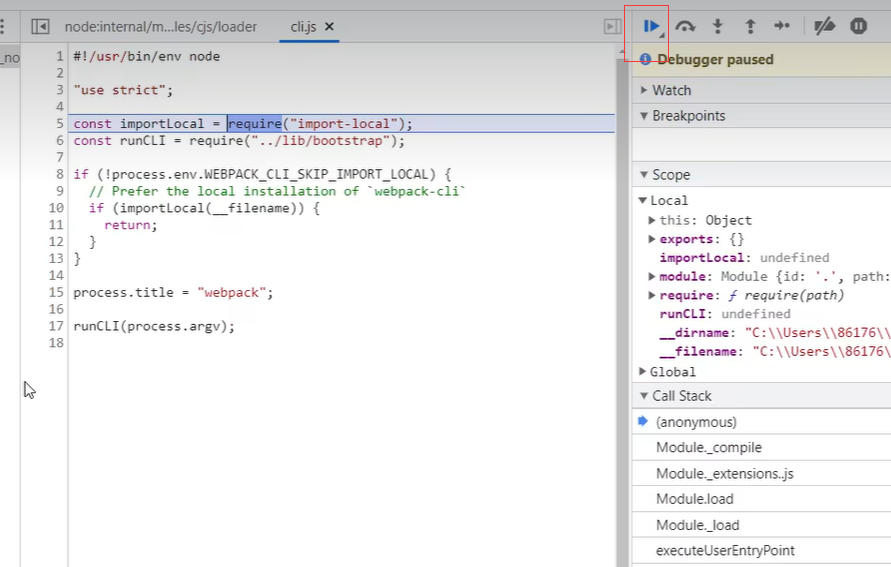
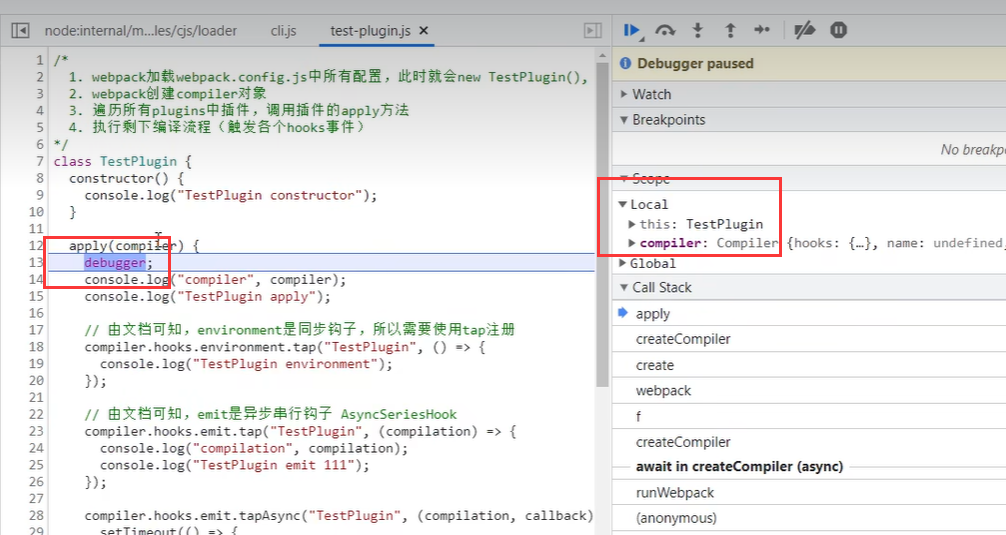
例子
BannerWebpackPlugin
javascript
// plugins/banner-webpack-plugin.js
class BannerWebpackPlugin {
  constructor(options = {}) {
    this.options = options;
  }

  apply(compiler) {
    // 需要处理文件
    const extensions = ["js", "css"];

    // emit是异步串行钩子
    compiler.hooks.emit.tapAsync("BannerWebpackPlugin", (compilation, callback) => {
      // compilation.assets包含所有即将输出的资源
      // 通过过滤只保留需要处理的文件
      const assetPaths = Object.keys(compilation.assets).filter((path) => {
        const splitted = path.split(".");
        return extensions.includes(splitted[splitted.length - 1]);
      });

      assetPaths.forEach((assetPath) => {
        const asset = compilation.assets[assetPath];

        const source = `/*
* Author: ${this.options.author}
*/\n${asset.source()}`;

        // 覆盖资源
        compilation.assets[assetPath] = {
          // 资源内容
          source() {
            return source;
          },
          // 资源大小
          size() {
            return source.length;
          },
        };
      });

      callback();
    });
  }
}

module.exports = BannerWebpackPlugin;
CleanWebpackPlugin
https://www.bilibili.com/video/BV14T4y1z7sw?p=83
javascript
// plugins/clean-webpack-plugin.js
class CleanWebpackPlugin {
  apply(compiler) {
    // 获取操作文件的对象
    const fs = compiler.outputFileSystem;
    // emit是异步串行钩子
    compiler.hooks.emit.tapAsync("CleanWebpackPlugin", (compilation, callback) => {
      // 获取输出文件目录
      const outputPath = compiler.options.output.path;
      // 删除目录所有文件
      const err = this.removeFiles(fs, outputPath);
      // 执行成功err为undefined,执行失败err就是错误原因
      callback(err);
    });
  }

  removeFiles(fs, path) {
    try {
      // 读取当前目录下所有文件
      const files = fs.readdirSync(path);

      // 遍历文件,删除
      files.forEach((file) => {
        // 获取文件完整路径
        const filePath = `${path}/${file}`;
        // 分析文件
        const fileStat = fs.statSync(filePath);
        // 判断是否是文件夹
        if (fileStat.isDirectory()) {
          // 是文件夹需要递归遍历删除下面所有文件
          this.removeFiles(fs, filePath);
        } else {
          // 不是文件夹就是文件,直接删除
          fs.unlinkSync(filePath);
        }
      });

      // 最后删除当前目录
      fs.rmdirSync(path);
    } catch (e) {
      // 将产生的错误返回出去
      return e;
    }
  }
}

module.exports = CleanWebpackPlugin;
AnalyzeWebpackPlugin
javascript
// plugins/analyze-webpack-plugin.js
class AnalyzeWebpackPlugin {
  apply(compiler) {
    // emit是异步串行钩子
    compiler.hooks.emit.tap("AnalyzeWebpackPlugin", (compilation) => {
      // Object.entries将对象变成二维数组。二维数组中第一项值是key,第二项值是value
      const assets = Object.entries(compilation.assets);

      let source = "# 分析打包资源大小 \n| 名称 | 大小 |\n| --- | --- |";

      assets.forEach(([filename, file]) => {
        source += `\n| ${filename} | ${file.size()} |`;
      });

      // 添加资源
      compilation.assets["analyze.md"] = {
        source() {
          return source;
        },
        size() {
          return source.length;
        },
      };
    });
  }
}

module.exports = AnalyzeWebpackPlugin;
InlineRuntimeWebpackPlugin
javascript
// plugins/inline-chunk-webpack-plugin.js
const HtmlWebpackPlugin = require("safe-require")("html-webpack-plugin");

class InlineChunkWebpackPlugin {
  constructor(tests) {
    this.tests = tests;
  }

  apply(compiler) {
    compiler.hooks.compilation.tap("InlineChunkWebpackPlugin", (compilation) => {
      const hooks = HtmlWebpackPlugin.getHooks(compilation);

      hooks.alterAssetTagGroups.tap("InlineChunkWebpackPlugin", (assets) => {
        assets.headTags = this.getInlineTag(assets.headTags, compilation.assets);
        assets.bodyTags = this.getInlineTag(assets.bodyTags, compilation.assets);
      });

      hooks.afterEmit.tap("InlineChunkHtmlPlugin", () => {
        Object.keys(compilation.assets).forEach((assetName) => {
          if (this.tests.some((test) => assetName.match(test))) {
            delete compilation.assets[assetName];
          }
        });
      });
    });
  }

  getInlineTag(tags, assets) {
    return tags.map((tag) => {
      if (tag.tagName !== "script") return tag;

      const scriptName = tag.attributes.src;

      if (!this.tests.some((test) => scriptName.match(test))) return tag;

      return { tagName: "script", innerHTML: assets[scriptName].source(), closeTag: true };
    });
  }
}

module.exports = InlineChunkWebpackPlugin;
license-webpack-plugin
javascript
class LicenseWebpackPlugin {
  constructor(params) {
    const { author } = params;
    this.author = author || '';
    this.source = `The MIT License (MIT)

    Copyright (c) 2019-present ${this.author}

    Permission is hereby granted, free of charge, to any person obtaining a copy
    of this software and associated documentation files (the "Software"), to deal
    in the Software without restriction, including without limitation the rights
    to use, copy, modify, merge, publish, distribute, sublicense, and/or sell
    copies of the Software, and to permit persons to whom the Software is
    furnished to do so, subject to the following conditions:

    The above copyright notice and this permission notice shall be included in
    all copies or substantial portions of the Software.

    THE SOFTWARE IS PROVIDED "AS IS", WITHOUT WARRANTY OF ANY KIND, EXPRESS OR
    IMPLIED, INCLUDING BUT NOT LIMITED TO THE WARRANTIES OF MERCHANTABILITY,
    FITNESS FOR A PARTICULAR PURPOSE AND NONINFRINGEMENT. IN NO EVENT SHALL THE
    AUTHORS OR COPYRIGHT HOLDERS BE LIABLE FOR ANY CLAIM, DAMAGES OR OTHER
    LIABILITY, WHETHER IN AN ACTION OF CONTRACT, TORT OR OTHERWISE, ARISING FROM,
    OUT OF OR IN CONNECTION WITH THE SOFTWARE OR THE USE OR OTHER DEALINGS IN
    THE SOFTWARE.`
  }
  apply(complier) {
    const that = this;
    complier.hooks.emit.tapAsync(
      'LicenseWebpackPlugin',
      function (complication, cb) {
        // console.log(complication.assets)
        complication.assets['LICENSE'] = {
          source: function () {
            return that.source;
          },
          size: function () {
            return that.source.length;
          },
        };
        cb();
      }
    );
  }
}
module.exports = LicenseWebpackPlugin;