 xxxsjan Docs
搭建 husky eslint prettier commitlint commitizen 规范的项目
一、安装 eslint
npm i eslint -D 执行初始化 npx eslint --init 按步骤走完
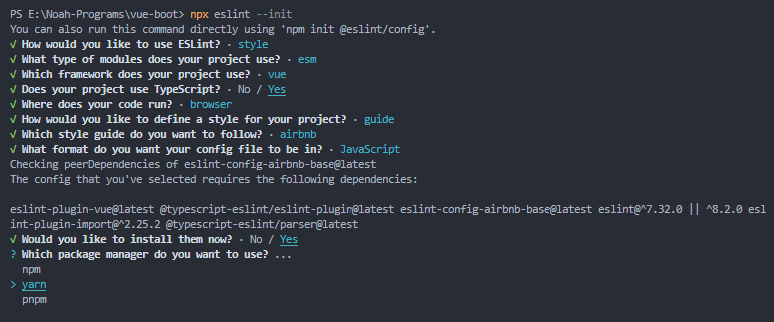
会生成.eslintrc 或者 .eslintrc.cjs文件
报错相关
1 变量未定义
module is not defined
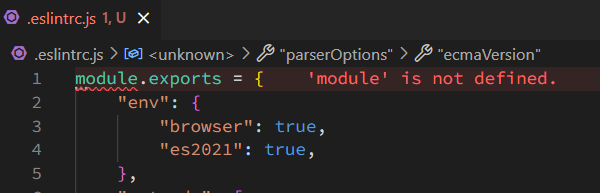
env: {
  +++  node: true,
    browser: true,
    es2021: true,
  },
自动引入后报错:api 未定义

通过配置vite.config.ts,使用AutoImport生成.eslintrc-auto-import.json
import AutoImport from "unplugin-auto-import/vite";
plugins:[
    AutoImport({
            include: [/\.[tj]s$/, /\.vue$/],
            imports: ["vue", "vue-router"],
            resolvers: [ElementPlusResolver()],
            eslintrc: {
              enabled: true
            }
    }),
]
再配置.eslintrc.cjs extends即可
extends: [
    'eslint:recommended',
    'plugin:vue/vue3-essential',
    'prettier',
    '.eslintrc-auto-import.json'
  ],
2 vue 文件会报 Parsing error: ‘>‘ expected
// 修改前
parser: '@typescript-eslint/parser',
 parserOptions: {
 ecmaVersion: 'latest',
 sourceType: 'module'
},

// 修改后
"parser": "vue-eslint-parser",
"parserOptions":{
  "parser":"@typescript-eslint/parser",
},
3 Parsing error: Unexpected token !
识别不了 ts 断言
pnpm add typescript @typescript-eslint/eslint-plugin @typescript-eslint/parser -D
parserOptions: {
    ecmaVersion: 'latest',
    sourceType: 'module',
+    parser: '@typescript-eslint/parser'
  },
plugins: [
 'vue',
+ '@typescript-eslint'
],
4 关闭eslint 规则造成的报错 ,也就是绕过
看到不爽的,统统可以进行关闭,比如
// .eslintrc.cjs
rules: {
    '@typescript-eslint/no-unused-vars': 'off',
    'vue/multi-word-component-names': 'off',
    '@typescript-eslint/ban-types': 'off',
    '@typescript-eslint/no-explicit-any': 'off',
},
命令
"lint": "eslint --ext .vue,.js,.ts src/",
"fix": "eslint --ext .vue,.js,.ts src/ --fix",
二、安装 prettier
npm i prettier -D 手动新建 .prettierrc,写点基础配置,如下
{
   "semi": true,
  "tabWidth": 2,
  "singleQuote": true,
  "arrowParens": "avoid",
  "trailingComma": "all",
   "htmlWhitespaceSensitivity": "ignore"

}
eslint 与 prettier 结合使用 安装依赖 npm i eslint-config-prettier eslint-plugin-prettier -D 配置.eslintrc 文件 把插件使用上
module.exports = {
  extends: [
    "eslint:recommended",
    "plugin:vue/vue3-essential",
    // 'plugin:prettier/recommended',
    + 'prettier'
  ],
}
三、安装 stylelint
安装 14 版本
相关依赖
"postcss": "8.4.19",
    "postcss-html": "1.3.0",
    "stylelint": "14.10.0",
    "stylelint-config-html": "1.0.0",
    "stylelint-config-prettier": "9.0.3",
    "stylelint-config-recommended": "7.0.0",
    "stylelint-config-recommended-scss": "8.0.0",
    "stylelint-config-recommended-vue": "1.4.0",
    "stylelint-config-standard": "25.0.0",
    "stylelint-config-standard-scss": "4.0.0",
    "stylelint-order": "6.0.3",
命令
pnpm add postcss@8.4.19 postcss-html@1.3.0 stylelint@14.10.0 stylelint-config-html@1.0.0 stylelint-config-prettier@9.0.3 stylelint-config-recommended@7.0.0 stylelint-config-recommended-scss@8.0.0 stylelint-config-recommended-vue@1.4.0 stylelint-config-standard@25.0.0 stylelint-config-standard-scss@4.0.0 stylelint-order@6.0.3 -D配置文件 stylelint.config.js
extends 的顺序有讲究的
module.exports = {
  defaultSeverity: 'error',
  extends: [
    'stylelint-config-standard',
    'stylelint-config-prettier',
    'stylelint-config-html/vue',
    'stylelint-config-recommended-scss',
    'stylelint-config-recommended-vue/scss'
  ],
  plugins: ['stylelint-order'],
  rules: {
    'max-empty-lines': 1,
    'order/properties-order': [
      'position',
      'top',
      'right',
      'bottom',
      'left',
      'z-index',
      'display',
      'justify-content',
      'align-items',
      'float',
      'clear',
      'overflow',
      'overflow-x',
      'overflow-y',
      'margin',
      'margin-top',
      'margin-right',
      'margin-bottom',
      'margin-left',
      'padding',
      'padding-top',
      'padding-right',
      'padding-bottom',
      'padding-left',
      'width',
      'min-width',
      'max-width',
      'height',
      'min-height',
      'max-height',
      'font-size',
      'font-family',
      'font-weight',
      'border',
      'border-style',
      'border-width',
      'border-color',
      'border-top',
      'border-top-style',
      'border-top-width',
      'border-top-color',
      'border-right',
      'border-right-style',
      'border-right-width',
      'border-right-color',
      'border-bottom',
      'border-bottom-style',
      'border-bottom-width',
      'border-bottom-color',
      'border-left',
      'border-left-style',
      'border-left-width',
      'border-left-color',
      'border-radius',
      'text-align',
      'text-justify',
      'text-indent',
      'text-overflow',
      'text-decoration',
      'white-space',
      'color',
      'background',
      'background-position',
      'background-repeat',
      'background-size',
      'background-color',
      'background-clip',
      'opacity',
      'filter',
      'list-style',
      'outline',
      'visibility',
      'box-shadow',
      'text-shadow',
      'resize',
      'transition'
    ]
  },
  // 指定需要忽略的文件
  ignoreFiles: [
    '**/*.js',
    '**/*.jsx',
    '**/*.ts',
    '**/*.tsx',
    '**/*.png',
    '**/*.ttf',
    '**/*.woff',
    '**/*.json',
    '**/*.md',
    '**/*.html'
  ]
};
文件忽略校验方法
// 忽略整個檔案
/* stylelint-disable */

// 忽略下一行
/* stylelint-disable-next-line */
package.json 命令
stylelint-check 命令中的 stylelint-config-prettier-check 为 stylelint-config-prettier 附带一个小 CLI 工具,可帮助您检查您的配置是否包含任何与 Prettier 冲突的规则。
{
  "scripts": {
    "lint:style": "stylelint \"src/**/*.{css,scss,vue}\"",
    "fix:style": "stylelint \"src/**/*.{css,scss,vue}\" --fix",
    "stylelint:check": "stylelint-config-prettier-check"
  }
}
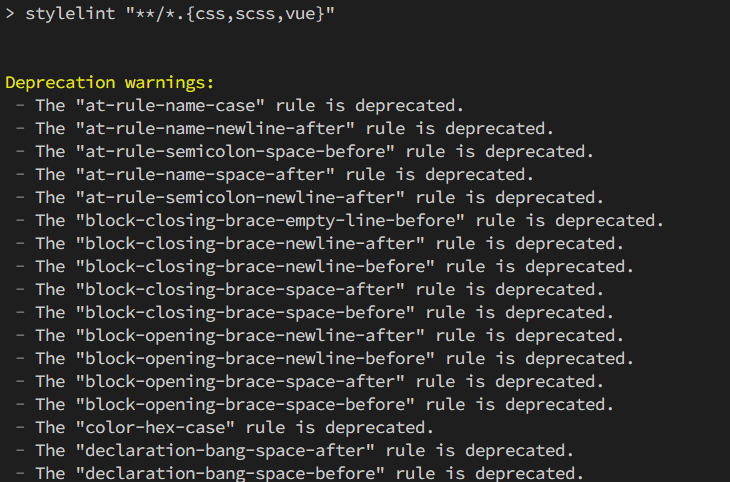
安装 15 版本(会警告)
装 15 的话会警告,因为移除了很多规则 会报很多规则启用的警告
相关依赖
{
  "postcss": "^8.4.21",
  "postcss-html": "^1.5.0",
  "stylelint": "^15.3.0",
  "stylelint-config-html": "^1.1.0",
  "stylelint-config-prettier": "9.0.3",
  "stylelint-config-recommended": "^11.0.0",
  "stylelint-config-recommended-scss": "^9.0.1",
  "stylelint-config-recommended-vue": "1.4.0",
  "stylelint-config-standard": "^31.0.0",
  "stylelint-config-standard-scss": "7.0.1",
  "stylelint-order": "^6.0.3"
}
配置文件 stylelint.config.js
extends: [
    'stylelint-config-standard',
    'stylelint-config-prettier',
    'stylelint-config-html/vue',
    'stylelint-config-recommended-scss',
    'stylelint-config-recommended-vue/scss'
],
plugins: ['stylelint-order'],
rules: {
    'order/properties-order': [
      'position',
      'top',
      'right',
      'bottom',
      'left',
      'z-index',
      'display',
      'justify-content',
      'align-items',
      'float',
      'clear',
      'overflow',
      'overflow-x',
      'overflow-y',
      'margin',
      'margin-top',
      'margin-right',
      'margin-bottom',
      'margin-left',
      'padding',
      'padding-top',
      'padding-right',
      'padding-bottom',
      'padding-left',
      'width',
      'min-width',
      'max-width',
      'height',
      'min-height',
      'max-height',
      'font-size',
      'font-family',
      'font-weight',
      'border',
      'border-style',
      'border-width',
      'border-color',
      'border-top',
      'border-top-style',
      'border-top-width',
      'border-top-color',
      'border-right',
      'border-right-style',
      'border-right-width',
      'border-right-color',
      'border-bottom',
      'border-bottom-style',
      'border-bottom-width',
      'border-bottom-color',
      'border-left',
      'border-left-style',
      'border-left-width',
      'border-left-color',
      'border-radius',
      'text-align',
      'text-justify',
      'text-indent',
      'text-overflow',
      'text-decoration',
      'white-space',
      'color',
      'background',
      'background-position',
      'background-repeat',
      'background-size',
      'background-color',
      'background-clip',
      'opacity',
      'filter',
      'list-style',
      'outline',
      'visibility',
      'box-shadow',
      'text-shadow',
      'resize',
      'transition'
    ]
  },
三、安装 husky lint-staged
husky----------操作 git 钩子的工具 lint-staged----本地暂存代码检查工具
npm i lint-staged husky -D
设置脚本:npm set-script prepare "husky install" 会在 packages.json 追加一条 script "prepare":"husky install"
启动脚本:npm run prepare 会生成.husky 目录
添加 git 钩子命令 npx husky add .husky/pre-commit "npx lint-staged"
创建.lintstagedrc.json
{
  "*.{js,jsx,ts,tsx,vue}": "eslint --ext .vue,.js,.ts src/"
}
或者
{
  "*.{vue,js,ts,jsx,tsx,css,sass,scss,json,md}": ["prettier --write"],
  "*.{vue,css,sass,scss}": ["stylelint --fix"],
  "*.{vue,js,jsx,ts,jsx,tsx}": ["eslint --fix"]
}
四、安装 Commitlint
Commitlint:用于校验填写的 commit message 是否符合设定的规范
npm i commitlint @commitlint/config-conventional -D
添加 husky 钩子 npx husky add .husky/commit-msg 'npx --no-install commitlint --edit "$1"'
五、安装 commitizen
Commitizen:是一个命令行提示工具,它主要用于帮助我们更快地写出规范的 commit message
npm i commitizen -g 全局安装
可选:使用 cz-conventional-changelog 规则 npm i cz-conventional-changelog -D 再执行
npx commitizen init cz-conventional-changelog --save-dev --save-exact
# npm commitizen init cz-conventional-changelog --save-dev --save-exact
# yarn commitizen init cz-conventional-changelog --yarn --dev --exact
# pnpm commitizen init cz-conventional-changelog --pnpm --save-dev --save-exact
上面的命令会在 package 里添加
"config": {
    "commitizen": {
      "path": "./node_modules/cz-conventional-changelog"
    }
 }
可选:使用自己的规则
npm i -D commitlint-config-cz cz-customizable
把 package.json 里的 commitizen 配置改成使用 cz-customizable
"config": {
    "commitizen": {
      "path": "node_modules/cz-customizable"
    }
 }
新建 commitlint.config.js 文件
module.exports = {
  // 使用 .cz.config.js里的规则
  extends: ['cz'],
  rules: {
    // 自定义
  }
};
新建 .cz-config.js
'use strict'
  module.exports = {
    types: [
      { value: '✨新增', name: '新增:    新的内容' },
      { value: '🐛修复', name: '修复:    修复一个Bug' },
      { value: '📝文档', name: '文档:    变更的只有文档' },
      { value: '💄格式', name: '格式:    空格, 分号等格式修复' },
      { value: '♻️重构', name: '重构:    代码重构,注意和特性、修复区分开' },
      { value: '⚡️性能', name: '性能:    提升性能' },
      { value: '✅测试', name: '测试:    添加一个测试' },
      { value: '🔧工具', name: '工具:    开发工具变动(构建、脚手架工具等)' },
      { value: '⏪回滚', name: '回滚:    代码回退' }
    ],
    scopes: [
      { name: 'leetcode' },
      { name: 'javascript' },
      { name: 'typescript' },
      { name: 'Vue' },
      { name: 'node' }
    ],
    // it needs to match the value for field type. Eg.: 'fix'
    /*  scopeOverrides: {
      fix: [
        {name: 'merge'},
        {name: 'style'},
        {name: 'e2eTest'},
        {name: 'unitTest'}
      ]
    },  */
    // override the messages, defaults are as follows
    messages: {
      type: '选择一种你的提交类型:',
      scope: '选择一个scope (可选):',
      // used if allowCustomScopes is true
      customScope: 'Denote the SCOPE of this change:',
      subject: '短说明:\n',
      body: '长说明,使用"|"换行(可选):\n',
      breaking: '非兼容性说明 (可选):\n',
      footer: '关联关闭的issue,例如:#31, #34(可选):\n',
      confirmCommit: '确定提交说明?(yes/no)'
    },
    allowCustomScopes: true,
    allowBreakingChanges: ['特性', '修复'],
    // limit subject length
    subjectLimit: 100
  }
最后使用 git cz 命令即可有提示的提交代码