 xxxsjan Docs
DeprecationWarning: Invalid 'main' field in
入口文件名与自定义冲突
原因: vue脚手架开发启动时会生成dist_electron文件夹 默认里面有index.js和package.json这两个文件 elelctron会以index.js作为启动文件 除非你package.json定义了main 所以有两种改法 1 改package.json的main字段值为index.js
"main":"index.js"2 package.json main是background的情况下 修改输出到dist_electron的文件 操作: 删除dist_electron目录 vue.config.js添加下面代码
pluginOptions: {
    electronBuilder: {
        chainWebpackMainProcess: (config) => {
            config.output.filename((file) => {
                if (file.chunk.name === 'index') {
                    return 'background.js';
                } else {
                    return '[name].js';
                }
            });
        }
    }
}
does not exist. Seems like a wrong configuration.
这个是electron:build报的错 原因是package.json里的main的值,在dist_electron目录下找不到
Failed to fetch extension
注释background.js 里的ready中的相关代码
app.on("ready", async () => {
  // if (isDevelopment && !process.env.IS_TEST) {
  //   // Install Vue Devtools
  //   try {
  //     await installExtension(VUEJS3_DEVTOOLS);
  //   } catch (e) {
  //     console.error("Vue Devtools failed to install:", e.toString());
  //   }
  // }
  createWindow();
});
RequestError: read ECONNRESET
方法一
这个设置不上,有问题的
1. npm config set ELECTRON_MIRROR http://npm.taobao.org/mirrors/electron/

2. npm install --save-dev electron
方法二
https换http 将registry中的https://registry.npmjs.org/替换成了http://registry.npmjs.org/ npm config set registry http://registry.npmjs.org/
方法三
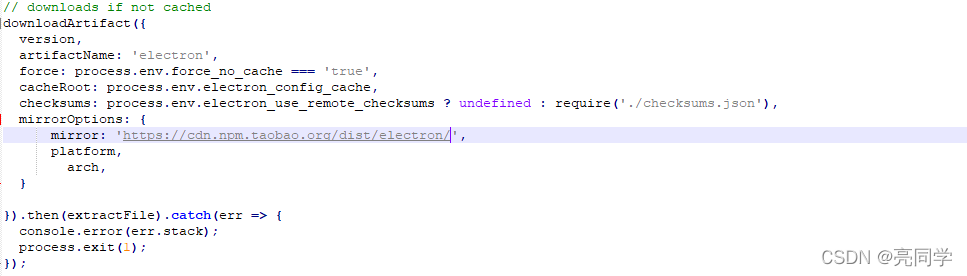
1.进入 node_modules/electron文件下, 编辑install.js 2. 修改downloadArtifact这段代码, 添加淘宝镜像地址https://npm.taobao.org/mirrors/electron 添加淘宝镜像地址https://cdn.npm.taobao.org/dist/electron/
mirrorOptions: {
    mirror: 'https://npm.taobao.org/mirrors/electron',
      platform,
      arch,
  },

mirrorOptions: {
    mirror: 'https://cdn.npm.taobao.org/dist/electron',
      platform,
      arch,
  }
总结
三也不管用 换镜像一般就可以解决了 使用https://registry.npm.taobao.org/或者http的 可能会很慢,但是是可以的,转圈等待是正常的,网速有在动的